The Town Square Rule: Paths First, Props Second
Town squares are chaotic places—markets, meetings, announcements, protests, festivals. But your battle map shouldn’t be chaotic.
A town square plays fast when:
- intersections and paths are obvious
- there are 2–3 clean movement lanes
- props are clustered into readable “stalls”
- there’s a clear “combat breaks out here” zone
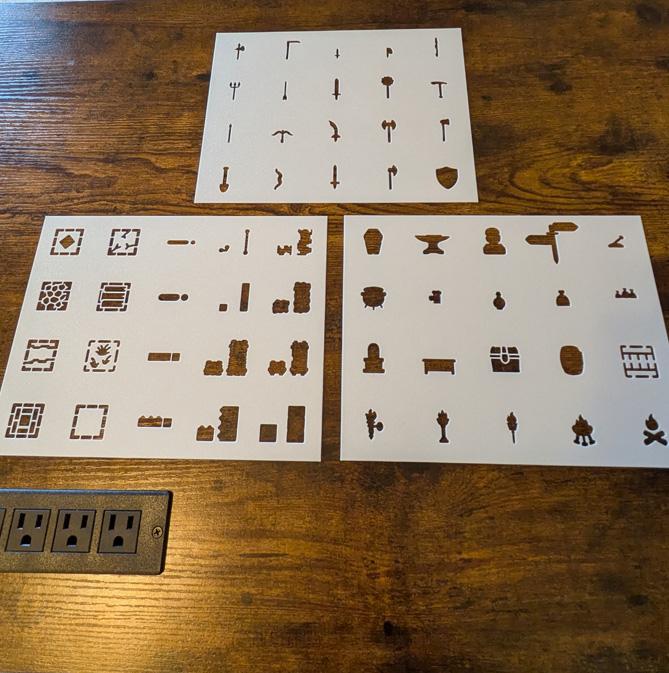
Your stencil toolbox for this:
- Cobble Stone Floor (main square / street)
- Grass Floor (edges, park strips, muddy overflow)
- Fence Wall (crowd control, pens, barriers)
- Signpost (crossroads, meeting point, objective marker)
- Crate / Barrel / Bags / Bag (stalls + cover + loot signals)
- Optional lighting: Standing Torch / Wall Torch (night scenes, drama)

Step 1: Draw the Paths (Where People Actually Walk)
Before you add a single stall, draw:
- the main road in
- the main road out
- 1–2 side streets or alleys
Make them thick enough to read and leave space for minis.
Path texture cheat
- Use Cobble Stone Floor for the “main traffic” areas.
- Use Grass Floor for the edges where people step aside, vendors set up, or things get messy.
> Tip
> Leave at least 2 squares wide for your main paths so groups can move without clogging.
Step 2: Use the Signpost as an Objective Magnet
Players will instinctively gravitate toward a signpost.
That’s great—use it.
Ways to use Signpost:
- “Meet me at the signpost”
- “Protect the messenger at the signpost”
- “The bounty notice is here”
- “The disguised cultist is waiting here”
Placement rule: put it where paths intersect (center-ish, but not necessarily dead center).
Step 3: Market Stalls = Clusters, Not Individual Items
Market stalls read best when props are clustered into recognizable groups.
You don’t need to draw every cart. You just need the *idea* of commerce.
Three stall cluster recipes
1) Crate + Bags = textiles, grain sacks, supplies
2) Barrel + Crate = ale, pickles, fish, storage
3) Crate + Bag + Barrel = bigger stall / busier vendor
> Tip
> Keep stalls on the edges of paths so the middle remains a clean fight lane.
Step 4: Fence Walls Control Crowds (and Combat)
The Fence Wall stencil is perfect for shaping a square without turning it into a maze.
Use fences for:
- animal pens
- vendor lines
- guard barricades
- “don’t cross” zones
- execution crowd lanes
Fence placement rule: fence should guide movement, not trap it. Always leave at least one gap or way around.
Step 5: Patrol Routes Decide Where Combat Breaks Out
If guards (or thugs) are present, your square has tension.
Show it by thinking in patrol routes.
Simple patrol patterns:
- loop around the stalls (crowd control)
- sweep past the signpost (meeting point / notices)
- guard the fenced zone (execution, prisoner wagon, VIP)
Where combat breaks out: usually where patrol + crowd + objective collide.
That’s your “hot zone.”
# Three Town Square Templates (Market, Execution Plaza, Festival Night)
Each template is fast to draw and easy to run.
Template 1: Market Square (Cover Everywhere)
Best for: pickpockets, robberies, ambushes, “protect the merchant” scenes
Stencil recipe
- Main square: Cobble Stone Floor
- Edge spillover: Grass Floor
- Signpost at a main intersection
- 6–10 stall clusters using Crate / Barrel / Bags / Bag
- A small fenced pen using Fence Wall (animals or crowd line)
Why it plays well
- lots of cover, lots of movement choices
- stalls create natural chase obstacles
- signpost acts as a “rally point” objective
Template 2: Execution Plaza (Open Drama + Crowd Control)
Best for: public announcement, hostage scene, riots, moral dilemmas
Stencil recipe
- Big open Cobble Stone Floor area (stage space)
- Fence Wall lanes for crowd control
- Signpost off to one side (notices, wanted posters)
- Minimal props: 2–4 clusters (don’t clutter the drama)
- Optional night scene: a few Standing Torches around the “stage”
Where combat breaks out
- at the fence gaps (crowd surge)
- near the stage/open center
- at the “VIP guard” choke point
> Tip
> Big open squares make ranged combat strong—use fences and stalls sparingly to create just enough cover.
Template 3: Festival Night (Light Creates Safe Zones)
Best for: celebrations, infiltrations, assassinations, “something goes wrong” scenes
Stencil recipe
- Split the square into:
- Cobble Stone Floor for main paths
- Grass Floor for festival edges / tents area
- Standing Torches to create “lit islands”
- Signpost as the meeting spot
- Market clusters (crates/bags/barrels) but fewer than the market template
- Small Fence Wall zones (queue lines, performance area)
Why it’s fun
- players choose between moving in light vs moving in shadow
- torches create natural objectives (“get to the lit area!”)
- chases feel cinematic because visibility changes
Common Town Square Mistakes (Easy Fixes)
- Too many stalls: cluster them and reduce count—leave lanes open.
- No clear intersection: add the signpost and make paths obvious.
- Fences everywhere: fences guide crowds; they shouldn’t become a maze.
- Everything cobble: mix in Grass Floor so the square has readable zones.
Next Steps
To expand your town square into a full “town session”:
- connect one path to a tavern (use Wood Wall + Wood Floor inside)
- add an undercity entrance for a rogue hideout (shift to Cobble Wall + Small Door)
- re-skin the square by swapping prop clusters (food market → contraband market → military checkpoint)
With just signposts, fences, textures, and a few prop clusters, you can run chases, negotiations, and full combats without slowing the table down.